Voice masks
Turn your voice into something else with ready-made masks, or build your own from pitch, size and tone.
dbl0m's Audio sits between your mic and Discord or your game. Pick a voice, a room or a mask and everyone hears the new you, with no delay you can feel.
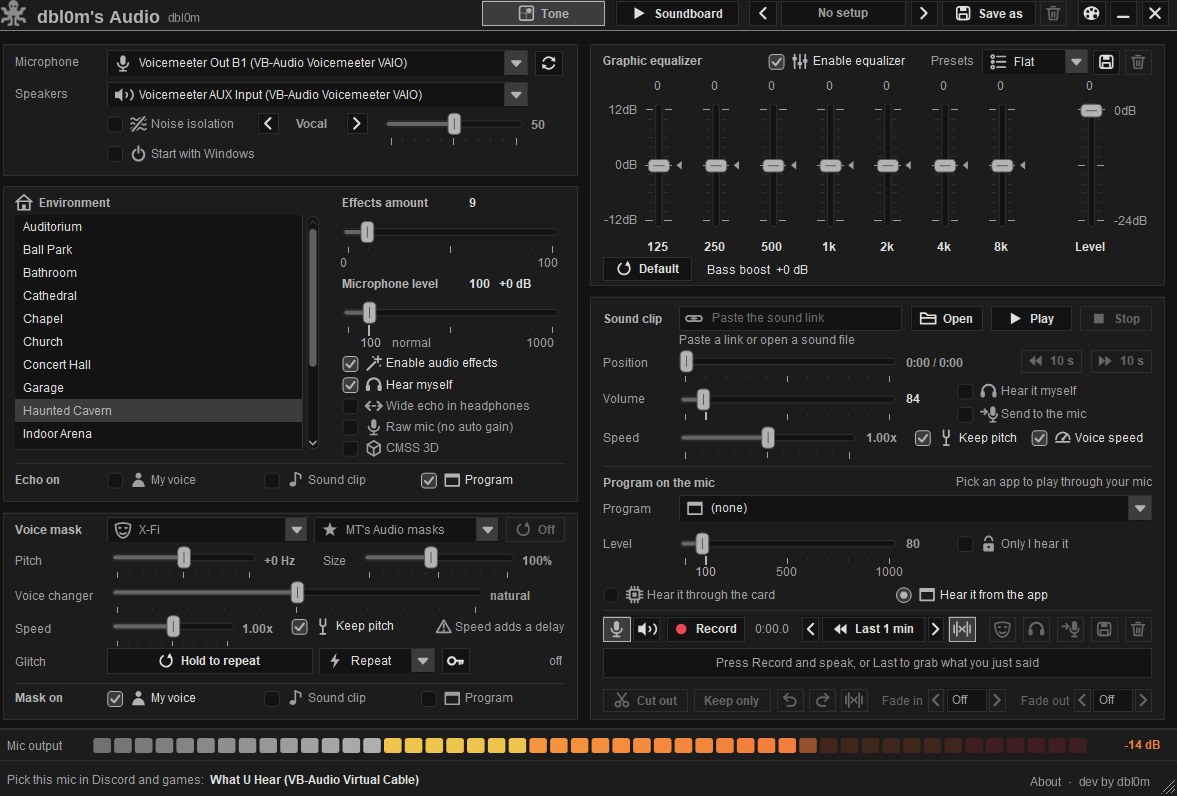
Everything on one screen. Change a setting and you hear it straight away.
Turn your voice into something else with ready-made masks, or build your own from pitch, size and tone.
Sound like you are in a cathedral, a garage, a concert hall or a haunted cavern. Choose how much of the room you hear.
Seven bands from 125 Hz to 8 kHz, a bass boost and presets you can save, so your mic sounds full instead of thin.
Keeps your voice and drops the keyboard, the fan and the room behind you.
Put clips on pads and fire them with a hotkey. Play a sound file or a link straight into your mic.
Missed something funny? Grab what you just said, trim it, fade it and save it.
Send a game, a browser or a music player through your mic, and choose whether only you hear it.
Save a whole sound as a setup and switch between them in one click. Ten color themes included.
Message dbl0m on Discord and choose a plan. You get a key like DBL-XXXXX-XXXXX-XXXXX-XXXXX.
Open the app, paste your key and tick Remember me. The key locks to your PC, so nobody else can use it.
In Discord or your game, choose the virtual mic the app shows you. That's it, you're talking with your new voice.
Every plan has every feature. The time starts the first time you activate.

I build and look after dbl0m's Audio. Questions, keys, a device reset or an idea for a new voice: send me a message.
Windows 10 or 11, 64-bit. The app also installs the free VB-CABLE virtual mic the first time, with one click.
Yes. Anything that lets you pick a microphone works: Discord, games, OBS, browsers and call apps.
Yes. Message dbl0m and he resets the device lock on your key. The next PC you activate on keeps it.
The app checks your key when it opens and every few minutes while it runs, so keep an internet connection.